Distance Calculator
You can use this distance calculator to find out the distance between two or more points anywhere on the earth. In other words, the distance between A and B. Click once on the map to place the first marker and then click again to position the second marker. The distance between the points will then be displayed. You can also build up a series of locations to find a total distance.
Use search result as a distance marker?
...Loading...
Paste in the list of coordinates to add to your route in the text box below:
About
An important feature of this distance calculator tool is that it is "as the crow flies", so traveling in real life will normally involve larger distances, but this may also help those who need to measure direct distances.
Want to save your route? Try the Advanced Google Maps Distance Calculator
How To Use
- Zoom and drag the map to find the location of marker 1
- Click to place marker 1.
- Zoom and drag the map to find the location of marker 2.
- Click to place marker 2.
- The distance will be calculated then displayed below the map in miles or kilometers. You can change between miles or km at any time
- Add as many points as required and the distance will build up.
- You can also drag and drop markers after they have been put on the map
- To share your route and distance calculation use the option [Generate Link For This Route]. You can then copy the link generated and send this via Twitter or Facebook.
Options
- Click [Clear Last] to undo the last marker placed
- Click [Zoom To Fit] to zoom the map around all markers
- Click [Clear Map] to erase all markers and start again
- Use the Quick Find text box to quickly relocate the map
- You can choose between miles and kilometers (km) for the Total Distance readout
How it Works
Clearly you, the user inputs two 'points' that are used to calculate the distance. Calculating the "As the Crow Flies" distance is a matter of using Great Circle formula. Then the main problem is converting the Google Map unit to miles and kilometers.
The map will also automatically save your route in your temporary internet cookies so that you can return and see the route as you last left it. If you ever need to start from scratch then use the [Clear Map] button.
Disclaimer
All distances are estimations so Daft Logic does not accept any responsibility that may arise when the value reported is incorrect.
Benchmark Tests
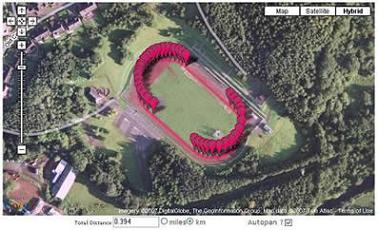
Map showing the Mary Peters Track in South Belfast. The reading shows 0.394km which is clearly a reasonable measurement for an athletics track.
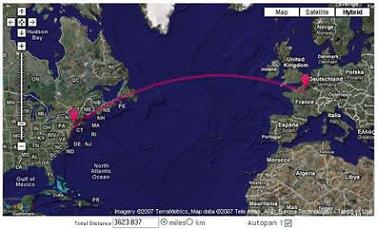
Map showing the estimated distance between New York and Paris. All references that can be found suggest that this is an accurate measurement.
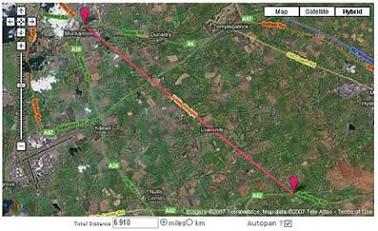
Map showing the Seven Mile Straight in County Antrim, Northern Ireland. This shows a reading of 6.910 miles.
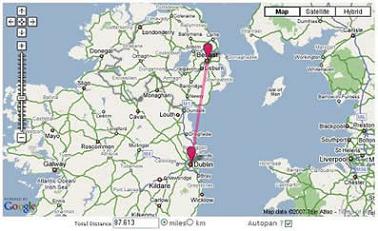
Map showing the distance between Belfast and Dublin. As far as I can see this is an accurate estimate (if there is such a thing). This trip would be approximately 100 miles by road so the proverbial crow would have less distance to travel.
Relevant Links
Further Uses and Ideas
- Remember auto-pan setting between sessions
- Show difference in elevation between markers
- Export a list of all waypoints and show the distance between each
Version History
| Version | Date | Description of Updates |
|---|---|---|
| 7.1 | 10th April 2025 | Bug Fix : When placing a location as a marker using latitude, longitude it didn't work |
| 7.0 | 22th March 2025 | UI Updates |
| 6.7 | 25th April 2022 | Bug fix: Upload Coordinates |
| 6.1 | 5th February 2021 |
Bug Fix: Clicking on an existing marker to add to the route did not work and also caused the tool to stop functioning Bug Fix: Autopan did not work initially until switched off and on. |
| 6.0 | 1st February 2021 | Implemented Leaflet Maps |
| 5.1 | 2nd August 2010 | Fixed autopan issue when map is resized |
| 5.0 | 31st July 2010 |
Implemented Google Maps Javascript API V3 Google Search bar at bottom left is not yet available. Sorry! Removed show mid-point button Uses new cookie so any previous systems/settings on your machine will be erased! Sorry! Please report any issues or bugs! |
| 4.1 | 21st February 2008 |
Removed Scroll Wheel Zoom in and out Added marker drag and drop functionality Removed Print Option (Ctrl+Print Screen works better) |
| 4.0 | 20th January 2008 |
Added Scroll Wheel Zoom in and out Complete conversion to API v2 Better Zoom to Fit Functionality Added crosshairs cursor |
| 3.2 | 1st October 2007 | Added Quick Find |
| 3.1 | 25th September 2007 | Added print map option |
| 3.0 | 15th June 2007 |
Move to API v2 Great Circle display and distance calculation Option to resize map height |
| 2.0 | 19th January 2006 |
Stop post back between clicks Calculate Mid Point Zoom to fit feature More than one marker as running total |
| 1.0 | 29th December 2005 | The Beginning |
Comments For This Page
Thank you for not forcing me to mangle my browser settings or trying to get me to download questionable software!!!
By David Eckard on 20th December 2025CALCULATOR IS COMPASSIONATE
By ZAIN EISA on 6th October 2025Thank You for Great Tool , i Use it and it Suits me Perfectly 👏
By ikaz on 22nd September 2025I've been following the project since 2010. It has been great to see where it came from but also wish that alot of the features (elevation and some other cool ones) were still integrated. I understand though that its costly to make this happen. Either way, this is the best tool on the internet and I still think out performs the Google measurement tool itself. Keep it up and if you can add elevation one day I look absolutely forward to it!
By Paul on 13th August 2025Hi TP. Sorry, that is not possible.
By Daft Logic on 11th August 2025I'm a little daft! In my last comment I forgot to thank you for sharing a handy, usefull program!
Is there a way to get azimuth of the drawn line?
By TP on 10th August 2025After several years, I continue to come back to your app for planning running routes. Whatever the haters say forget em. You do a stunning piece of work, and it is really, really appreciated! It is great to see the ongoing commitment that you have, when most developers in a niche tend to move on.
Best,
A happy runner
Finally, newer satellite images. Particularly, in and near the northwest city limits of Las Vegas, around the Kyle Canyon interchange and along Kyle Canyon Rd. I want to see the area around and near the Kyle Canyon interchange having no room for building homes. I want to see home development expand down Kyle Canyon Rd, ever closer to Mt. Charleston and the homes there. Until there is at least one home per block, throughout the long drive. After all, the homes in Mt. Charleston are also parts of Las Vegas. Even Lee Canyon's Ski Resort is part of Las Vegas. Which is why I hope that someday, they build a traffic tunnel through the one mountain between Mt. Charleston and Lee Canyon. A tunnel barely one mile long. With a toll. Certainly feasible. And a road without a tunnel could be built from Lee Canyon to Pahrump. And a road and tunnel could shorten the driving distance from the west end of Summerlin Pkwy to Mt. Charleston to just 15 miles. But for now, a road without a tunnel could be built from Summerlin Pkwy to Kyle Canyon through Little Red Rock. For this time being, the expansion of home development around and past the Kyle Canyon interchange and also expanding down Kyle Canyon Rd is exciting enough to me. But not when satellite images are years old. So finally...
On 5th July 2025How do i change labels language? All middle east is in Arabic!
By john mitchell on 19th June 2025Hi Shea, not sure what you mean by not accessible? Does it not open? Can you describe how you are searching for somewhere foreign? (sorry for all the question marks!!!!!!!!!)
By Daft Logic on 5th May 2025is the distance calculator not accessible any longer ??????????
it does not appear to allow me search for anywhere foreign except my own home location!!!!!!!!!!!!!
Hi Tom, it had to be switched off as the costs to run it did not balance out with the free to use model. Even with the help of ads it was not sustainable.
By Daft Logic on 1st May 2025what happened to the Elevation ? we use for cycling plans. ty
By Tom on 1st May 2025End User. Thanks. We found the bug and fixed it. Please retest.
By Daft Logic on 9th April 2025Yes, I thought that was the issue as well. But even when I turned on the option "Use search result as a distance marker", it still does not work. It just brings me to the general area, with no visible marker identifying the actual location point.
By End User on 7th April 2025End User, is it that you need to switch on the option "Use search result as a distance marker" ?
By Daft Logic on 3rd April 2025Something has gone wrong since the latest update. When I add coordinates for Point A, it takes me to the general area, but the marker does not appear. It seems as if I have to add the marker manually. When trying to pan to the second point, Point B, additional markers as being placed on the map, making it impossible to find the distance between Point A and Point B.
By End User on 3rd April 2025mingle, can you explain how it doesn't work?
By Daft Logic on 1st April 2025it dosent work
By mingle on 1st April 202520 out of 2226 comments shown.
Add Your Comment
There's no need to create an account or provide unnecessary details. Just your comment.