Find Elevation on Map
Determine the elevation at any point on the world map.
...Loading...
Description
Use a map to determine the elevation when a point is located on a map. You can click/tap as many times as required to find the elevation of multiple points.
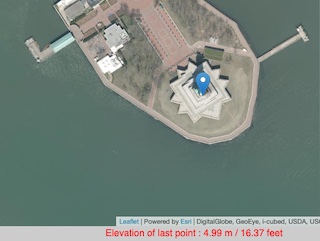
Example: Elevation of the Statue of Liberty, New York City
How To Use
- Click on the map on a location where you wish to find the altitude
- The altitude will be displayed in the message box below the map and when you hover over the marker
- You can click to place more than one marker and return to hover over each in order to find out the altitude again
- Click the [Clear Map] button in order to remove all markers and start again
- Use the search option to find a place
- Click on a marker to remove it
You can also access a CSV list of latitude, longitude, altitude in meters and altitude in feet for every marker you place on the map.
Future Updates and Ideas
- Allow input of location by latitude, longitude coordinates
References and Attributions
Terrain Tiles was accessed on 27th November 2022 from https://registry.opendata.aws/terrain-tiles
Relevant Links
Leaflet - Leaflet is the leading open-source JavaScript library for mobile-friendly interactive maps
Version History
| Version | Date | Notes |
|---|---|---|
| 5.3 | 30th March 2025 |
Bug fix: Lat/Lng beside mouse pointer was in the wrong location Bug fix : CSV Output was not appearing |
| 5.2 | 28th March 2025 | UI Updates |
| 5.1 | 21st September 2024 | New option: Show latitude, longitude beside mouse pointer |
| 5.0 | 29th November 2022 | Update: New Data Source |
| 4.3 | 15th November 2022 | Bug Fix: Cumulative Distance issue when removing markers |
| 4.2 | 4th October 2018 | New Elevation data provider |
| 4.1 | 4th October 2018 | Search tool added |
| 4.0 | 27th September 2018 | Switched to Leaflet Maps |
| 3.3 | 16th October 2016 | Clicking on an elevation marker now removes it |
| 3.2 | 18th August 2016 | Cumulative distance is now output |
| 3.1 | 26th October 2015 | New option to draw a line between the markers |
| 3.0 | 23rd November 2013 | Added option to Upload and Plot Addresses with their elevation You are here |
| 2.4 | 10th November 2013 | Removed Google Local Search API (Deprecated) |
| 2.4 | 7th October 2013 | Added scale control |
| 2.3 | 31st August 2011 | Now outputs altitude immediately from a search |
| 2.2 | 17th August 2010 | Added output to CSV option to allow export of latitude, longitude, meters and feet |
| 2.1 | 11th August 2010 | Added new local search facility Brought back output in feet |
| 2.0 | 10th August 2010 |
Implemented Google Maps API V3 Now uses the Google Maps API Elevation Service |
| 1.3 | 4th December 2009 | Output now also displayed in feet |
| 1.2 | 21st March 2009 | Enlarged output text at bottom of map |
| 1.1 | 28th December 2008 | Added quick find option |
| 1 | 28th September 2008 |
Comments For This Page
Hello
By Peter on 30th May 2025The cumulative distance calculation is not accurate.
On 29th April 2025The message box is not appearing anymore
On 29th March 2025Why is the box for choosing multiple coordinates not appearing anymore?
On 29th March 2025What is the vertical coordinate system for the elevation value?
On 29th March 2025where can I find the age of the imagery?
On 23rd January 2025Ghem, we have added a new option "Show latitude,longitude beside mouse pointer"
By Daft Logic on 1st September 2024A box with the latitude and longitude to find the elevation would be very useful.
By Ghem on 27th August 2024Please add number to each marker spot (or checkbox to toggle on/off) so we can correlate with the height data list
By Gerald Lock on 18th June 2024Any update on the fix? Defaults to value of 999m for any location entered.
On 27th April 2024Hi, elevation does not work anymore.
By Bill on 27th February 2024Any chance of adding nautical miles (nm) as an option for distance output please?
By cs0rfe on 23rd October 2023Gerald, the interface is currently providing the best resolution for each particular area.
By Daft Logic on 12th May 2023Is it possible to allow a closer zoom factor/resolution? The current zoom factor/resolution is a bit too vague, given the height accuracy is to 0.01m
By Gerald Lock on 11th May 2023I dont think this is very accurate, being playing around in my local area in North Wales and have found multiple errors on the supposed "heights"
By Steve Hancock on 12th April 2023Bonjour, altitudes en NN ou en NGF ?
On 22nd February 2023Add Your Comment
There's no need to create an account or provide unnecessary details. Just your comment.